Booking page
Your booking page, your brand.
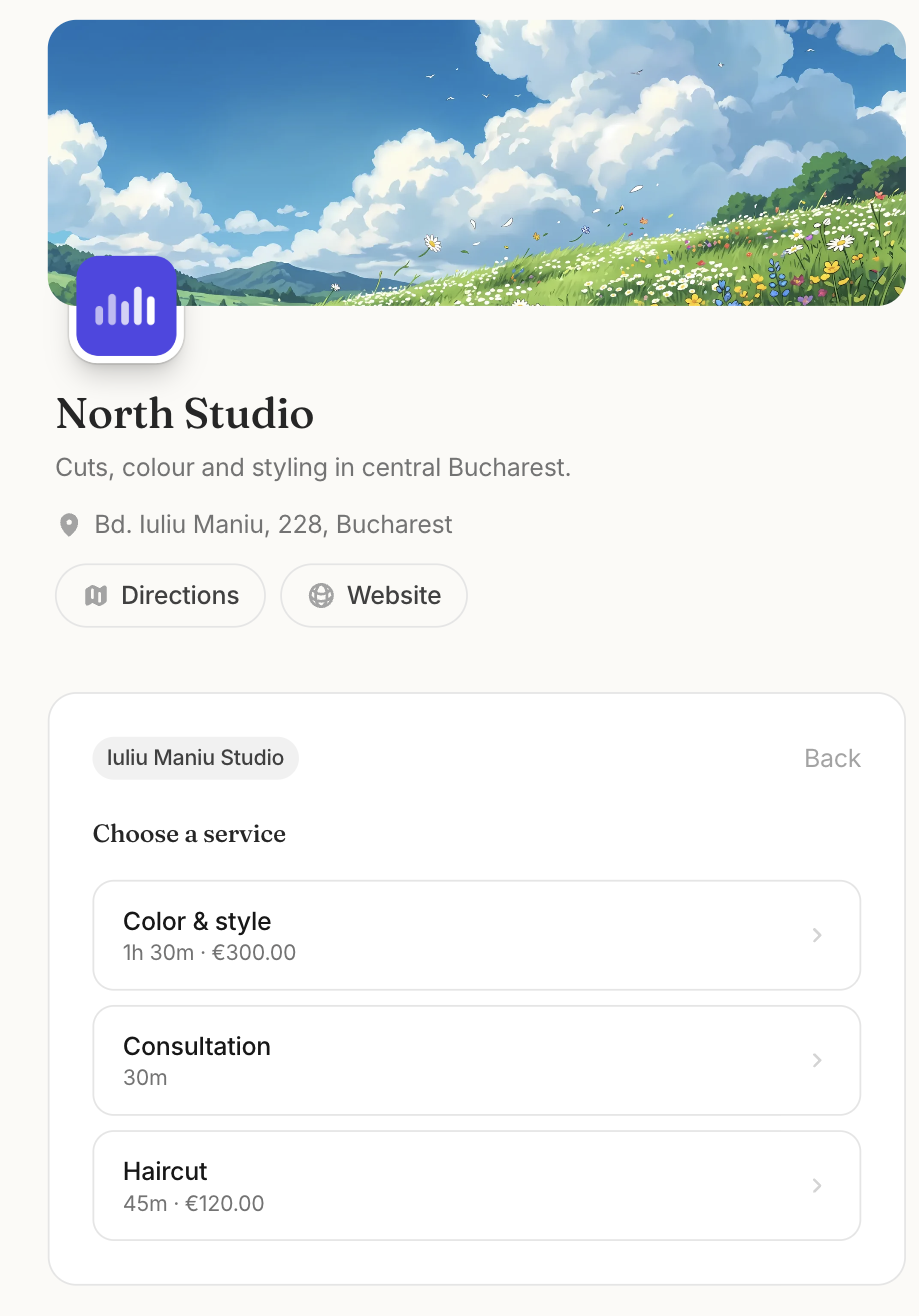
A fast public page with your logo, colors and photos, where customers pick a service, a person and a time in under a minute.
Every plan, including Free. Your page lives at bookify.one/your-name. See pricing
Branded by clicking
Header photo, logo and colors are edited by clicking the page itself, no designer needed.
Found on Google
City-aware titles, descriptions and structured data help your page show up for local searches.
Directions built in
Map pin, directions and contact chips per location, so customers always find the door.
Made for phones
Smart phone input with country flags and validation; no app or account needed to book.
Why it matters
A page that books, not just a page that informs.
Most small businesses send customers to an Instagram bio, a WhatsApp chat or a phone number, and then do the booking by hand. Every one of those conversations costs a few minutes and happens while you are busy with someone else. The booking page turns that conversation into a one-minute flow the customer finishes alone.
It is yours from the first visit: your logo, your colors and your header photo, edited by clicking the page itself. Customers choose a location, a service and a person with prices in plain sight, pick a time from live availability and confirm with a name and a phone number. No app, no account, no password to forget.
It is built to be found, too. Each page has city-aware titles and descriptions, structured data for Google and a fast, light design that loads on a weak mobile connection. Directions, a map pin and contact chips per location mean customers turn up at the right door.
How it works
A customer’s one minute
-
01
They open your link from your Instagram bio or Google profile.
-
02
They pick the location, service and person, prices in plain sight.
-
03
They choose a time from live availability.
-
04
They confirm with a name and phone; the SMS arrives before they lock their screen.
In practice
Booking page in a real week.
Link in bio, booked at midnight
A follower taps your Instagram link after hours and books without sending a single message.
Bookify for nail studiosFound on Google
Someone searches for physiotherapy in your city and lands on your page with your services and prices.
Bookify for physiotherapyThe right address
Two locations, each with its own map pin and directions, so the car arrives at the right bay.
Bookify for auto detailingBefore and after
What changes on day one.
| Task | The old way | With Bookify |
|---|---|---|
| Taking a booking | A chat that takes minutes | One minute, self-service |
| After hours | Missed until morning | Booked while you sleep |
| Your brand | A generic form | Your logo, colors, photos |
| Being found | Social profiles only | City-aware SEO |
The details
Exactly what you get.
- Your logo, colors and header photos
- Edited by clicking the page itself
- City-aware titles and structured data for Google
- Map, directions and contact chips per location
- Phone input with country flags and validation
- No app or account required to book
Works together
Stronger with the rest of Bookify.
Good to know
Frequently asked questions.
Straight answers to what owners ask before switching.
Can I put it on my own website too?
Yes. The booking widget embeds the same page on any site with one line of code.
How do customers find the page?
Your link in bio, your Google Business profile, and local searches thanks to city-aware SEO.
How much can I change the design?
Logo, colors and photos are yours; the layout stays the fast, proven flow customers finish in under a minute.
Can I choose my own address?
Yes. You pick bookify.one/your-name when you sign up, and you can change it later in your business settings.
Can customers add the appointment to their calendar?
Yes. The confirmation includes a calendar file they can add to any calendar app.
Can customers install the page like an app?
Yes. The booking page can be added to a phone’s home screen and opens like an app.
Your next appointment could book itself.
Set up your services, share your link, and watch the calendar fill in. Free to start, no card.