What stops a client finishing a booking
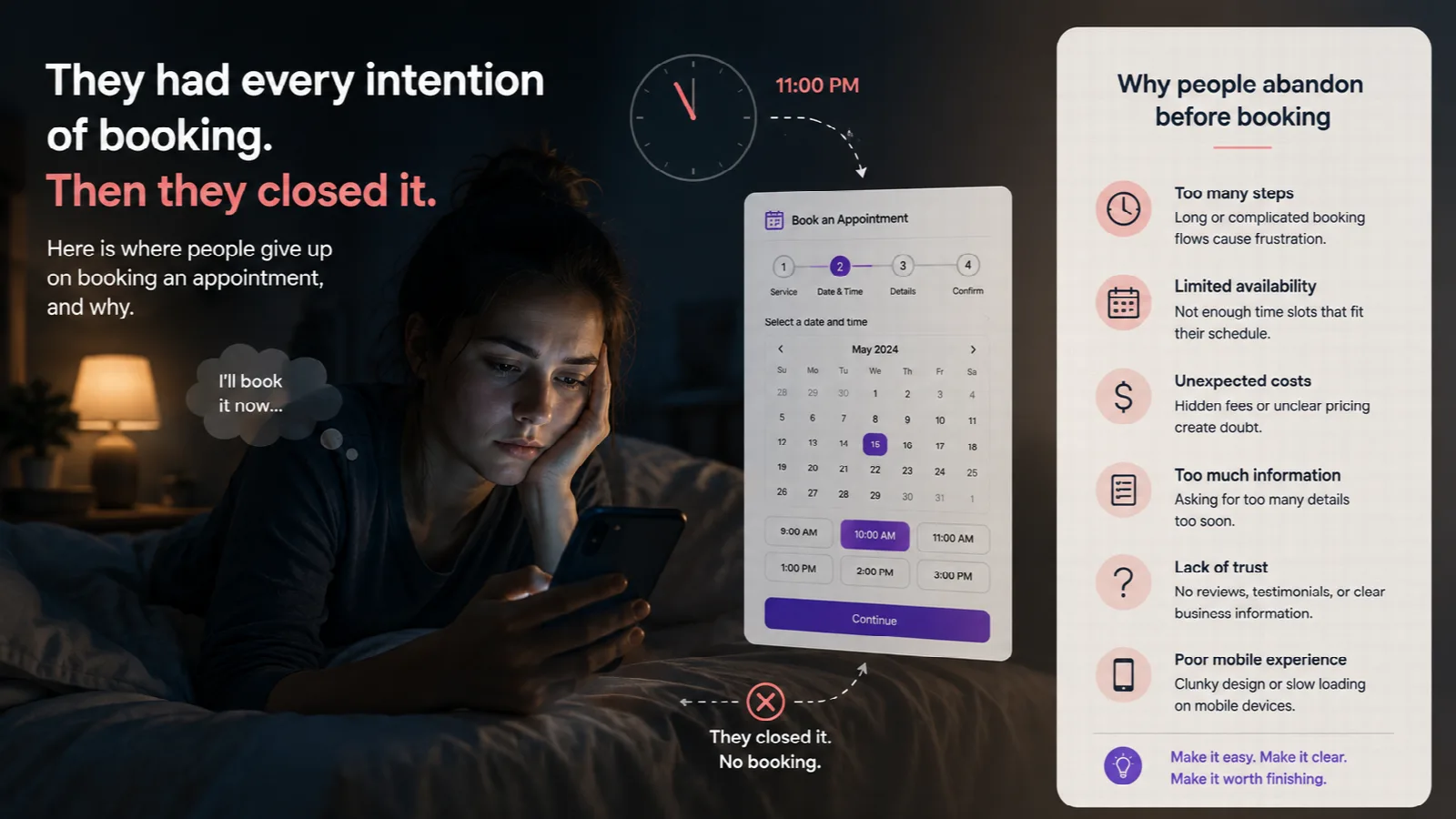
Here is a person who wanted to book with you. It is 11pm, they are on the sofa, they found your link in your Instagram bio, and they opened it with every intention of booking a haircut for Saturday.
Then they closed it.
They will not tell you why. They probably could not say exactly. But the reasons are fairly predictable, and most of them are fixable in an afternoon.
They were asked to make an account
This is the biggest one, and it is not close. A booking page that opens with "Sign up or log in" loses a large share of the people who reach it, before they have seen a single available time.
Nobody wants an account with their barber. They want Saturday at ten. Ask for a name and a phone number at the point of booking, and nothing before. If they come back next month they type it again — ten seconds, and no password to have forgotten. Behind the scenes the same number lands on the same client record, so your list does not fill up with duplicates.
Bookify's booking page has no accounts on the client side at all, and that is deliberate.
They could not find the thing they wanted
Your services are named the way you think about them. Your clients search for them the way they say them.
"Cut and finish" means something to you. The person on the sofa is looking for "haircut". "Full head highlights" and "balayage" are different services to a colourist; to a lot of clients they are the same wish. When the name they have in their head is not on the list, a surprising number assume you do not do it and leave.
Name services in the words clients use, put the popular ones first, and keep the list short enough to read on a phone without scrolling twice. Services is where this lives. If your list has grown to twenty entries, that is a separate problem, and what a nail studio price list should say is about exactly that.
They were shown times you could not honour
Two versions of this, and both end the same way.
The first is a page that shows slots without checking whether you are actually free — so they book Saturday at ten, you ring on Friday to say sorry, and they do not try again. The second is a page that shows so few slots that Saturday looks fully booked when it is not, because the tool is hiding times it does not understand.
The fix for both is the same: the page should show every slot that is genuinely free and no slot that is not. That means it has to know your hours, your buffers, your time off, and what is already in your personal calendar. Scheduling explains how those combine. Stop double bookings across two calendars covers the personal-calendar half.
They did not know what it would cost
A service with no price next to it reads as "expensive" to some people and "I will have to ask" to others. Both close the tab.
Put the price on the page. If it varies, put the starting price and say so. Clients are far more forgiving of "from £45" than of nothing at all.
It asked for too much
Name. Phone. Email, maybe. That is the list.
Every extra field — address, date of birth, "how did you hear about us", a paragraph of notes — is a place to give up, and the give-up rate per field is higher on a phone than you would guess. If you genuinely need something else, ask for it in the chair, not on the page.
One detail worth getting right: the phone number. A page that rejects a number because it was typed without a country code, or with spaces, is turning away a real person over formatting. Bookify's page works out the country and tidies the number as they type, so "07700 900123" and "+44 7700 900123" both just work.
Nothing happened afterwards
They booked. Then silence. By Thursday they are not sure it went through, so they message you to check, which is the phone call the booking page was meant to replace.
A confirmation should arrive within seconds, by SMS, with the day, the time, the service and who they are seeing. Then a reminder the day before. Notifications lists what goes out and when.
The confirmation should also give them a way to cancel. It feels counter-intuitive to make cancelling easy, but a client who cannot cancel does not turn up instead — they just do not turn up. A cancel link in the confirmation email frees the slot early enough for someone else to have it. That is one of the four things that actually reduce no-shows.
What "finished" actually looks like
Open your own booking page on your phone and time yourself booking a haircut, from tapping the link to seeing the confirmation. Under a minute and under ten taps is the standard. If you are not there, the list above is where the taps went.
If you are still taking most bookings by message, from a paper diary to a booking page is the practical order to move over without losing anyone.
- book appointments online
- online booking
- appointment booking page
- booking conversion
- book an appointment
- mobile booking
- booking link
Your next appointment could book itself.
Start free trial